
Check ETA Australia Status – VEVO and Online Tracking
After applying for your Australian Electronic Travel Authority, you may want to check your ETA status to confirm it has been approved. This guide covers the two main methods for checking your ETA – the VEVO (Visa Entitlement Verification Online) system and the AustralianETA app – along with what to do if your status shows pending or denied.
For a general overview of the ETA system, see our ETA Australia guide.
How to Check Your ETA Status
There are two primary ways to check your Australian ETA status:
- VEVO (Visa Entitlement Verification Online) – The official government visa checking tool
- AustralianETA App – The mobile application used for your original application
Both methods provide the same information, so use whichever is most convenient for you.
Checking ETA Status via VEVO
VEVO is the official Department of Home Affairs tool for checking visa status in Australia. It is free to use and available 24/7.
Step-by-Step VEVO Guide
Step 1: Visit the VEVO website
Go to the VEVO page on the Department of Home Affairs website and select “Check your own visa details.”
Step 2: Select your document type
Choose “Passport” as your travel document type.
Step 3: Enter your details
You will need to provide:
- Visa grant number – Found in your ETA approval email
- Passport number – The passport you used for your application
- Date of birth – As shown on your passport
- Country of passport – Your passport issuing country
Step 4: Complete the verification
Solve the CAPTCHA (security verification) and submit your query.
Step 5: View your results
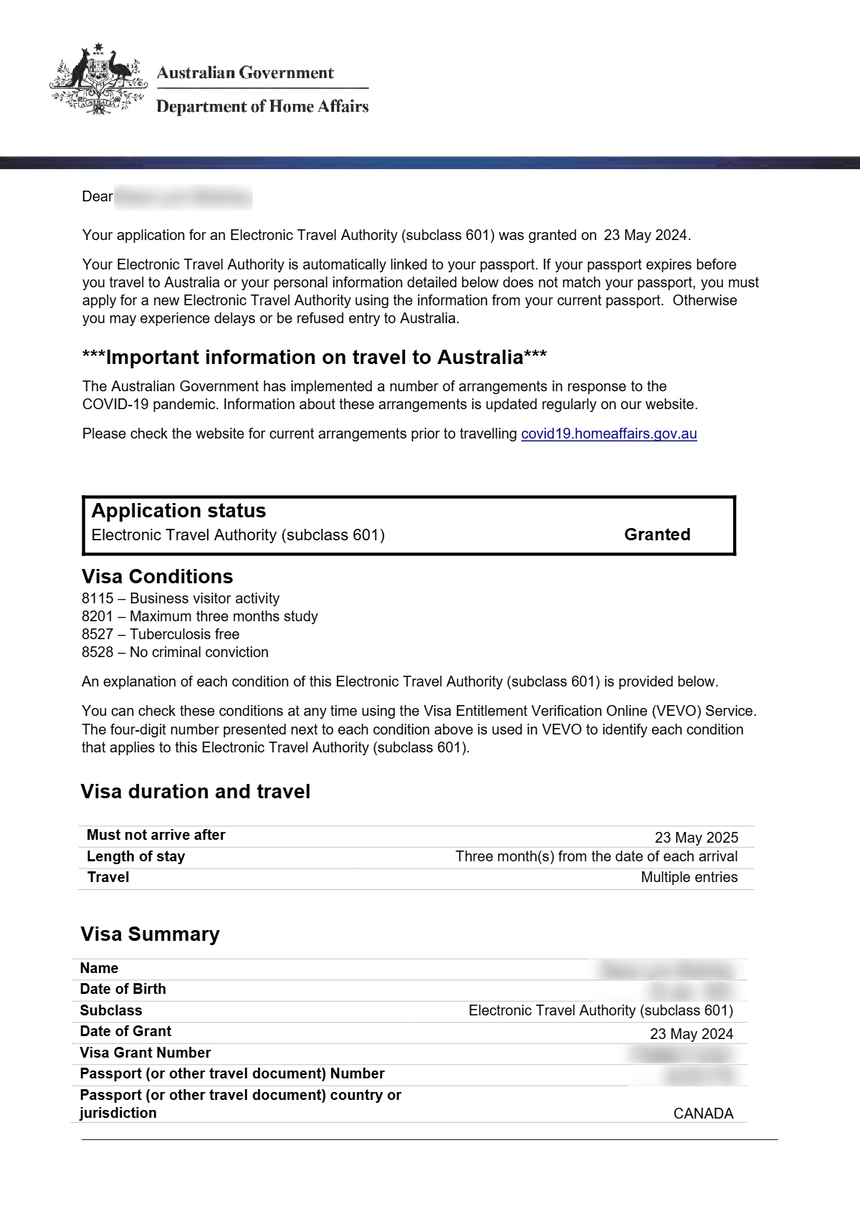
VEVO will display:
- Visa status – Granted, pending, or refused
- Visa subclass – 601 (Electronic Travel Authority)
- Visa grant date – When your ETA was approved
- Visa expiry date – When your ETA expires
- Conditions – Any conditions on your visa
- Entries allowed – Multiple entries
What the VEVO Status Means
| Status | Meaning | Action Required |
|---|---|---|
| In Effect | Your ETA is active and valid | No action needed – you can travel |
| Pending | Application under review | Wait for processing |
| Refused | Application was denied | See our denied guide |
| Expired | Your ETA validity has ended | Apply for a new ETA |
| Ceased | Your ETA was cancelled | Contact Department of Home Affairs |
Checking ETA Status via the AustralianETA App
If you applied through the AustralianETA app, you can check your status directly within the app.
Step-by-Step App Guide
Step 1: Open the AustralianETA app
Launch the app on your smartphone or tablet.
Step 2: Sign in
Enter your account credentials (email and password).
Step 3: View your application
Your current ETA status will be displayed on the main screen. You can tap on it for detailed information including:
- Application status (Approved, Pending, Denied)
- Visa grant number
- Grant date
- Expiry date
- Visa conditions
Step 4: Check notifications
The app sends push notifications when your status changes. Ensure notifications are enabled in your phone settings.
When to Check Your ETA Status
You should check your ETA status at these key times:
After application submission
Most applications are processed within minutes. Check 15-30 minutes after submitting to confirm approval.
Before booking flights
Verify your ETA is approved before committing to non-refundable travel bookings.
Before departure
Check your ETA status 24-48 hours before your flight to ensure nothing has changed.
During your validity period
If your passport is nearing expiry, check that your ETA is still valid (it expires when your passport expires).
Before re-entering Australia
If you have traveled to Australia previously on the same ETA, check that it is still within the 12-month validity period.
What to Do If Your ETA Shows “Pending”
A pending status means your application is being processed. This is normal for some applications.
Typical processing times:
- Most applications: Approved within minutes
- Some applications: 1-3 business days
- Complex cases: Up to several weeks
What to do while pending:
- Wait at least 72 hours before taking further action
- Check your email (including spam folder) for any requests for additional information
- Do not submit a duplicate application – this will not speed up processing
- Contact the Department of Home Affairs if processing exceeds 7 days
Factors that may cause longer processing:
- Additional security checks required
- Name matches against database records
- Previous immigration history requiring review
- Incomplete or inconsistent application data
What to Do If Your ETA Shows “Refused”
If your status shows “Refused,” your application was denied. This does not necessarily mean you cannot visit Australia.
Immediate steps:
- Review any notification emails from the Department of Home Affairs
- Identify the likely reason for refusal
- Address the issue before reapplying
- Consider alternative visa options
For comprehensive guidance on handling denials, see our ETA Australia denied guide.
What If You Lost Your Visa Grant Number?
Your visa grant number is required for VEVO checks. If you have lost it:
Recovery options:
- Check your email – Search for “ETA” or “Department of Home Affairs” in your inbox
- AustralianETA App – Sign in to your account; the grant number is displayed in your application details
- Contact the Department of Home Affairs – They can help you locate your grant number using your passport details
Prevention tips:
- Save your grant notification email in a dedicated folder
- Take a screenshot of your approval in the AustralianETA app
- Write down your grant number and keep it with your travel documents
Using VEVO for Third-Party Verification
VEVO is also used by employers, education providers, and other organizations to verify your visa status. You can provide your VEVO details to:
- Airlines (to verify your right to travel)
- Hotels (to confirm visa status)
- Employers (to verify work rights – note: ETA does not permit work)
- Education providers (to verify study rights – note: ETA does not permit formal study)
To share your visa details, generate a VEVO authentication number and provide it along with your passport details to the verifying organization.
Practical Tips for ETA Status Checking
- Save your grant number – Store it securely for easy access
- Check before travel – Always verify your ETA is active before heading to the airport
- Monitor passport expiry – Remember that your ETA expires when your passport expires
- Use the app – The AustralianETA app provides the most convenient status checking
- Keep email notifications – Enable email alerts for status changes
- Check from anywhere – VEVO is accessible worldwide via the internet
FAQ – Check ETA Australia Status
How do I find my visa grant number?
Your visa grant number was provided in the approval email sent by the Department of Home Affairs. You can also find it by signing into the AustralianETA app and viewing your application details.
How long does ETA processing take?
Most ETA applications are approved within minutes. Some applications require additional processing and may take 1-3 business days. Complex cases can take longer. See our processing time guide for details.
Can I check someone else’s ETA status?
You can check another person’s visa status through VEVO if you have their passport details, visa grant number, and date of birth. This is commonly done by employers, travel agents, and family members.
What if VEVO shows different information than the app?
The VEVO system and the AustralianETA app should show the same information. If you see a discrepancy, wait a few hours and check again, as systems may take time to synchronize. If the discrepancy persists, contact the Department of Home Affairs.
Can I check my ETA status at the airport?
Airlines can verify your visa status through VEVO at check-in. However, it is your responsibility to ensure your ETA is valid before arriving at the airport. Check your status in advance to avoid issues.
Does checking my ETA status affect the application?
No, checking your status has no impact on your application or visa. You can check as often as you like through VEVO or the app without any effect on your ETA.